Event Planning Spreadsheet: Checklist, Budget & Guests
Picture an office manager asked to organise the company’s end-of-year party. There is a venue to book, a caterer to pay in two instalments, 120 RSVPs to chase, ten tables to fill and a running order for the evening. The details end up split between emails, a guest list and a sticky note on the monitor. An event planning spreadsheet keeps it together: type the event date and budget once, and the checklist, payments, guests, seating and schedule all work from them.
Here is how to plan any event in a spreadsheet, followed by a tour of the Event Planning Tracker for Excel and Google Sheets.
Get the Event Planning Tracker →
Why event planning gets messy
Events have many moving parts that depend on one date. Common problems:
- Deadlines written as dates, not as “weeks before”. If the event moves, everything has to be redone.
- Vendor payments tracked in email. Deposits and final balances are easy to miss.
- Guest list and seating kept apart. A late RSVP change can overfill a table without anyone noticing.
- No plan for the day itself. Timings live in someone’s head.
Event apps can help, but many are built for ticketed public events, not a team offsite, a fundraiser dinner or a workshop.
How to set up an event planning spreadsheet
1. Set the date and budget first
Put them at the top of a setup sheet. Everything else refers back to these two numbers.
2. Build a countdown checklist
Write tasks as “days before the event”: book venue at 90, send invites at 45, confirm numbers at 7. Calculate the due date from the event date, so a new date updates the whole list.
3. Show what is next
A short list of the next open tasks, soonest first, is more useful day to day than a full checklist.
4. Track budget three ways
Estimated, actual and paid are different numbers. Keeping all three stops surprises when the final invoices arrive.
5. Schedule vendor payments
For each vendor, record the deposit and final balance with their due dates, and flag anything coming up or overdue.
6. Connect guests to tables
Record RSVP, party size, meal choice and table for each guest. Then total the seats per table and compare with capacity.
7. Write a run of show
List the day minute by minute: doors, welcome, food, speeches, close. Durations help you spot an overpacked schedule.
A sample countdown for a mid-sized event
Every event is different, but a rough countdown like this is a useful starting point:
- 12 to 8 weeks before: set budget, book venue, shortlist caterers and key vendors.
- 8 to 6 weeks before: send invitations, pay deposits, plan the programme.
- 4 weeks before: chase RSVPs, confirm menu choices, order signage or printed materials.
- 2 weeks before: finalise the guest list and seating, draft the run of show.
- 1 week before: confirm final numbers with vendors, pay balances due, share the run of show with helpers.
- The day after: settle any remaining invoices and send thank-you messages.
Budget categories to start with
Most events share a core set of costs: venue, food and drink, staffing, audio-visual equipment, decor, printing and signage, entertainment or speakers, transport and a contingency line. Start with these, delete what you do not need and add anything specific to your event. A contingency of a small share of the total budget gives you room for the surprises that nearly every event brings.
Keeping the guest list and seating in step
Guest lists change right up to the event. Record party size, not just names, so a “plus one” counts as two seats. Assign tables only once most RSVPs are in, and recheck table totals after every late change. Note meal choices next to each guest so the caterer’s numbers match the seating plan, and keep a short list of guests who need a seat near the door or the stage. On the day, a printed copy of the final table plan at the entrance saves a lot of questions and helps guests find their seats quickly.
Day-of tips
Print the run of show and the table plan and give copies to anyone helping. Keep vendor contact numbers on the same sheet. Build a little slack into the schedule, because speeches and food service usually run longer than planned.
Inside the Event Planning Tracker spreadsheet
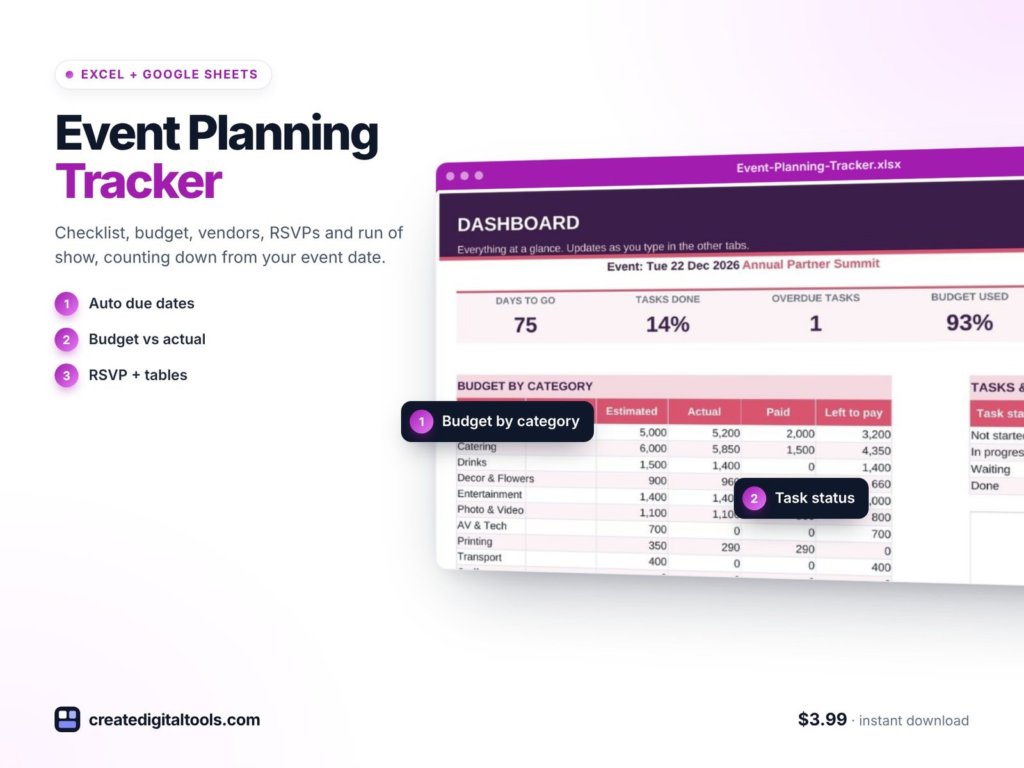
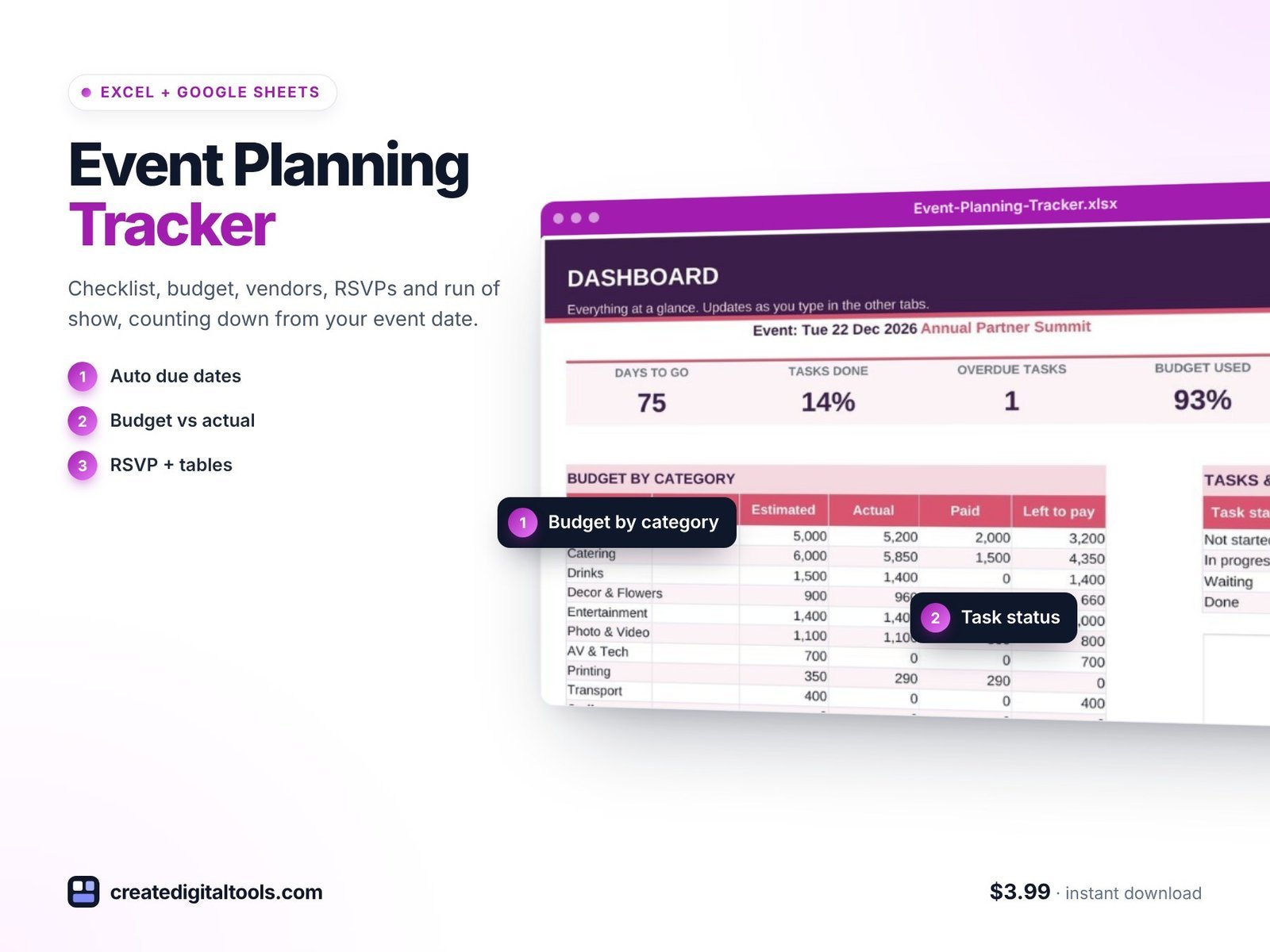
The Event Planning Tracker is a ready-to-use spreadsheet for Microsoft Excel and Google Sheets. Type your event date and budget once, and the checklist, budget, vendor payments, guest list, table plan and dashboard all work from it. It has 10 connected tabs.
Start Here and Setup
Start Here gives a 6-step setup and colour key. Setup holds the event date, budget, categories and team.
Dashboard
Countdown, progress, budget used and RSVPs, with charts.
Checklist
250 tasks with due dates that count back from the event. Move the date and the whole plan moves.
Next Up
The next 15 open tasks, soonest first.
Budget
Estimated versus actual versus paid, with payment flags.
Vendors
Contacts, stage, and deposit and final payment dates, with flags for each.
Guests & RSVP
Room for 300 guests with RSVP, party size, meal and table.
Tables
Seats used versus capacity for 20 tables. The guest list feeds the seating and warns you when a table is over capacity.
Run of Show
The day minute by minute, with automatic durations.
Also included
- A setup guide PDF.
- A video walkthrough.
- Sample data that follows today’s date.
Formulas only: no macros, no add-ons and no subscription. It works in Excel 2016 and later, Microsoft 365 and Google Sheets.
See the setup guide and full tour here:
Who it is for
A good fit if you:
- Plan corporate events, conferences, launch parties, birthdays, fundraisers or workshops.
- Want deadlines that move automatically if the date changes.
- Need to keep vendor deposits and final payments in view.
- Handle seating and want a warning before a table overfills.
Probably not for you if you:
- Need online ticket sales or check-in at the door.
- Run large multi-day festivals with hundreds of vendors and staff.
Hosting the event to launch a new product? The Product Launch Planner spreadsheet covers the launch timeline, content and metrics. More templates are in our spreadsheets collection.
FAQ
Does it work in Google Sheets?
Yes. It works in Google Sheets, Microsoft 365 and Excel 2016 and later.
Can I use it for a wedding or birthday?
It works for any event with a date, a budget, vendors and guests, from corporate events to birthdays and fundraisers.
How many guests and tables does it handle?
Up to 300 guests and 20 tables, plus 250 checklist tasks.
What if my event date changes?
Update it in Setup. Checklist due dates count back from the event, so they all move with it.
Are there macros or add-ons?
No. It is formulas only, delivered as an instant download.
Plan your next event from first idea to final thank-you
For $3.99, get a checklist, budget, vendor schedule, guest list, seating plan and run of show that all share one event date.
Get the Event Planning Tracker →
Microsoft Excel is a trademark of Microsoft Corporation and Google Sheets is a trademark of Google LLC. This is an independent template, not affiliated with or endorsed by Microsoft or Google.
Notion systems, spreadsheets and planners with a setup guide. Instant download.