Event Planning Studio OS
Run every event from enquiry to the final cue in a connected Notion workspace for clients, vendors, tasks, budgets, guests and payments. Notion template, $19. You get a PDF with the Duplicate link. Click Duplicate to copy it into your free Notion workspace.
$19.00
Product Details
Run every event from enquiry to the final cue in a connected Notion workspace where clients, vendors, tasks, budgets, guests and payments link together.
What’s inside
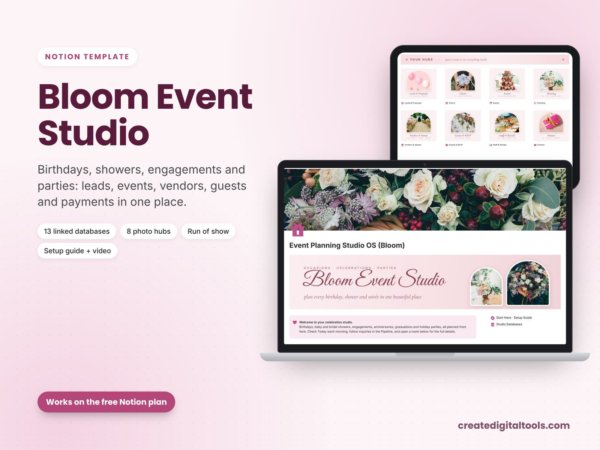
- Studio dashboard with photo navigation: upcoming events, open tasks, fees to collect and spend by category (chart)
- Event hub page for every event: run of show, tasks, budget lines, guest list and payments together
- Automatic countdown, prep progress bar (tasks done vs total) and budget health (On budget / Watch / Over)
- Run of show with clock times, owners and cue notes, sorted for the day
- Planning tasks board by phase with due dates and owners
- Budget & expenses with planned vs actual, variance and an over-budget flag
- Client fees and payments: deposit, instalments, balance due and paid status
- Vendor directory gallery with categories, contact details, rating and events booked
- Guests & RSVP with meal choices and table numbers, RSVP yes counted per event
- Linked databases with relations, rollups and formulas, plus sample data and a Start Here guide
Who it’s for
- Event planners and coordinators
- Corporate, party and wedding planners
- Venue and hospitality teams who run several events at once
What you get
- Template link (PDF) to duplicate into your Notion workspace
- Setup Guide PDF with step-by-step instructions
- Video walkthrough
How delivery works
You get a PDF with the Duplicate link. Click Duplicate to copy it into your free Notion workspace.
- Buy and download the PDF with your template link.
- Open the link and click Duplicate (log in to Notion first; the free plan works).
- Open the Start Here page and follow the setup steps.
Good to know
- Digital product: nothing physical is shipped.
- You need a Notion account (the free plan works).
- Sample data is fictional; photos from Unsplash.
- This template is an organising tool for your events business. It is not legal or financial advice.
- Notion is a trademark of Notion Labs, Inc.; this is an independent template.
New to Notion? Create a free account (affiliate link: I may earn a commission at no extra cost to you).
Watch the full walkthrough: youtube.com/watch?v=Q7j8MmjQ9X4