Party Planner Notion Template for Celebration Planners

Picture a party planner heading into a busy season: two milestone birthdays, a baby shower, an engagement party and a holiday party for a small office, all within a few weeks. Each one has its own client, venue, vendors, guest list and fee schedule. Enquiries for next month keep arriving too. A party planner Notion template keeps every celebration, every task and every fee to collect on one dashboard, so nothing falls between the cake order and the RSVP list.
This post shows how to organise a celebration planning business in Notion, and walks through Bloom Event Studio, a soft floral workspace built for planners who run birthdays, showers, engagements, anniversaries and holiday parties.
Why party planning gets chaotic
Celebrations are smaller than weddings or corporate events, but there are more of them, and they often overlap. That creates its own problems:
- Enquiries go cold. A message comes in about a birthday party, you reply, and then it slips down the inbox before a proposal goes out.
- Vendors repeat across events. The same florist, baker or rentals company works on several parties, but their details and bookings are scattered.
- Guest lists live in clients’ spreadsheets. RSVPs come back in messages and are counted by hand.
- Fees are hard to chase. Deposits and balances for several events at once are easy to lose track of.
- Staff and rentals clash. Without seeing which event has which staff and rentals, double-booking happens.
A notebook or a generic task app holds lists, but it cannot connect a guest to an event to a client to a fee. Linked Notion databases can.
The aim is not more admin. It is fewer moments where you have to stop and search: for a vendor’s number, for the latest guest count, or for whether a client has paid the deposit. When every record links to the celebration it belongs to, those answers are a click away.
How to build a party planner Notion template yourself
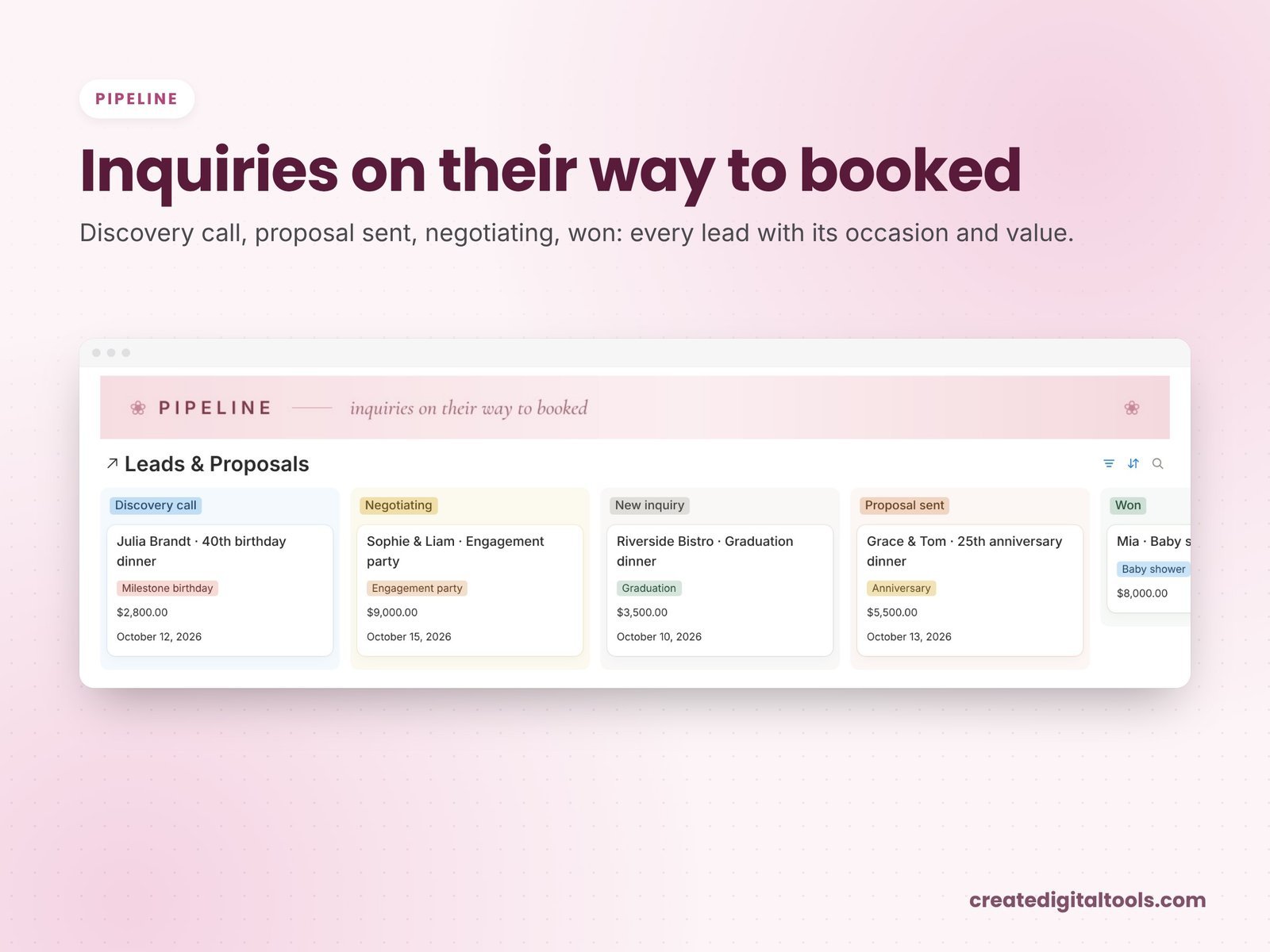
- Start with leads. A Leads database with the type of celebration, date, budget range and stage. A board view grouped by stage (enquiry, proposal sent, booked, lost) shows what needs a reply.
- Convert leads into clients and events. When a lead books, create the client and the event, and relate them. One client may book several events over the years.
- Keep planning tasks per event. Each task belongs to an event and has a due date. A “Today” view filtered to tasks due today or overdue keeps you on track.
- Build a vendor and venue directory. Contact details, category and notes, related to the events they work on. Next time, you can see who you have worked with before.
- Track guests and RSVPs per event. Each guest is related to an event with an RSVP status. A rollup on the event counts confirmed guests.
- Record staff and rentals. Link each to the event they are booked for, so you can see what is committed on any date.
- Track fees to collect. Fees and payments related to each event, with a filtered list of everything still to collect.
- Make it pleasant to open. A dashboard you enjoy looking at gets used. Photo navigation to each hub and a calm colour palette help.
Tip: create a template page for each type of celebration (for example, a baby shower checklist) inside the Events database, so every new event starts with the right tasks.
A simple weekly rhythm
Planning tools only help if you open them. A light weekly rhythm keeps everything current without taking over your evenings:
- Monday: reply to every new enquiry in the pipeline and send any proposals that are waiting.
- Midweek: confirm vendors, staff and rentals for the next two celebrations.
- Thursday: check RSVPs and send reminders to guests who have not answered yet.
- Friday: look at the fees to collect and send polite reminders for deposits or balances that are due.
Inside Bloom Event Studio
Bloom Event Studio ($19) is a Notion template for party and celebration planners and small event studios managing several celebrations at once. You get a template link (PDF) to duplicate into your workspace, a Start Here guide inside the template and a video walkthrough. Linked databases with relations, rollups and formulas come with sample data.
Dashboard and hubs
The dashboard has an At a glance section and floral photo navigation to each hub: Leads & Proposals, Clients, Events, Planning, Vendors & Venues, Guests & RSVP, Staff & Rentals, and Finance.

Today
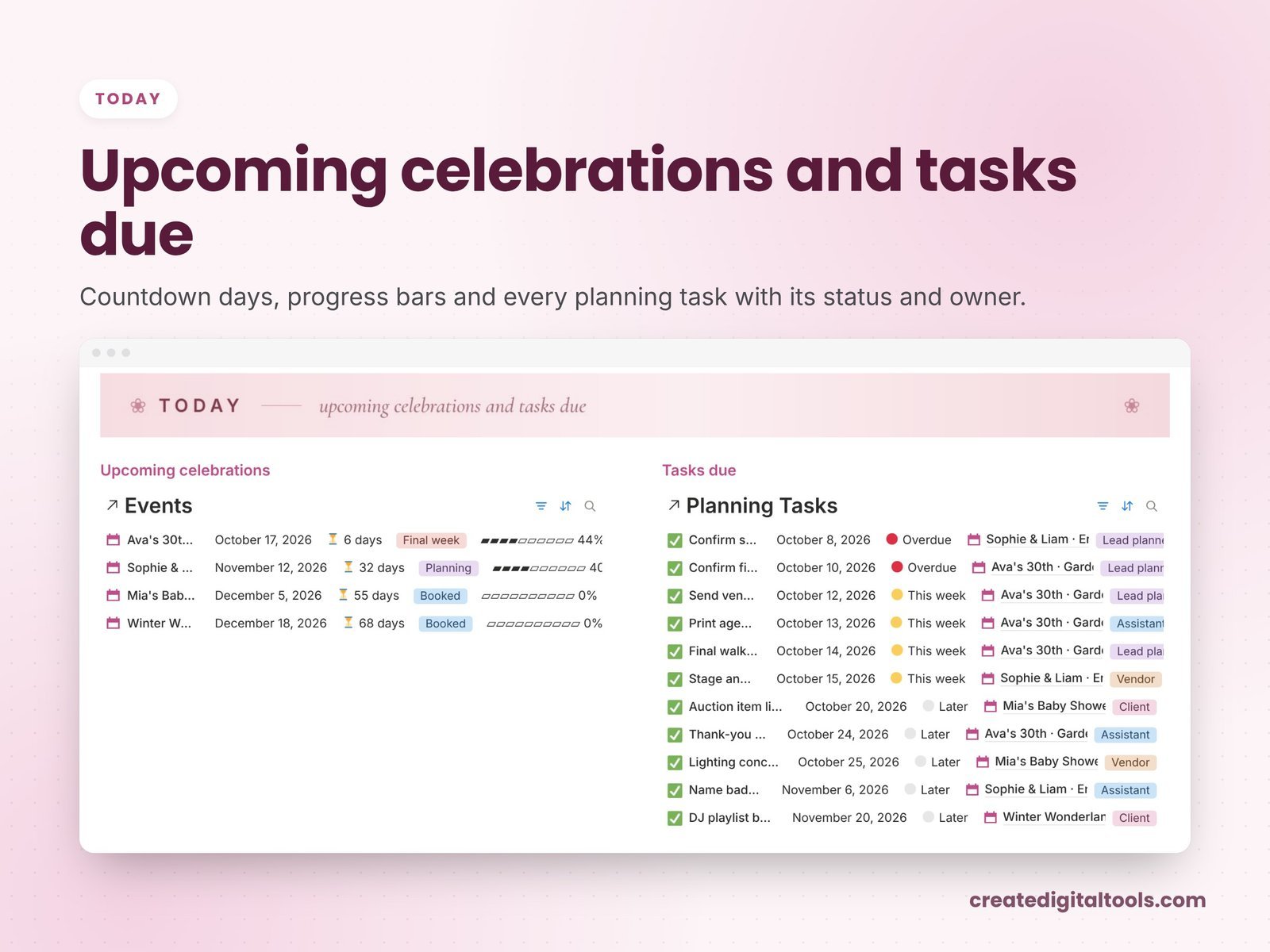
The Today section shows upcoming celebrations and planning tasks due, so you can start each day knowing what matters.
Leads and proposals
A lead pipeline board tracks every enquiry from first contact onward.
Events, vendors, guests, staff and rentals
Vendors, venues, staff and rentals are kept with the events they belong to. Guest lists and RSVPs are tracked per event.
Finance
The Finance section includes charts and a Fees to collect list, so outstanding balances are always in view.
Watch the full walkthrough
Take a tour of Bloom Event Studio in this video:
Getting started in your first week
- Read the Start Here guide and open a sample celebration to see how the client, vendors, guests and fees link to it.
- Add every open enquiry to the lead pipeline, so nothing waiting for a reply is missed.
- Enter your booked celebrations with their clients and dates.
- Build your vendor and venue list from the suppliers you use most, then link them to the events they are booked for.
- Add planning tasks with due dates for the next event on the calendar, so the Today section starts working straight away.
- Record fees and deposits already agreed, so the Fees to collect list is complete.
- Swap in your own photos if you like, and delete the sample data once you are set up.
Who it is for (and who it is not for)
A good fit if you:
- Plan birthdays, showers, engagements, anniversaries or holiday parties for clients
- Run several celebrations at once and need them connected
- Want leads, guests, vendors and fees in a workspace that feels soft and calm
Probably not a fit if you:
- Mainly run large corporate events with detailed run-of-show timings (see the option below)
- Need online ticketing or guest check-in
- Want clients to log in to their own portal
Running corporate events or need a run of show and budget-versus-actual tracking? Event Planning Studio OS is built for that. Browse all Notion templates.
FAQ
Does it work on the free Notion plan?
Yes. You need a Notion account, and the free plan works.
How is it delivered?
You download a PDF with the Duplicate link. Log in to Notion, open the link and click Duplicate, then follow the Start Here page.
Can I change the photos and colours?
Yes. Once duplicated, it is your workspace. The photos are from Unsplash, and you can swap them for your own.
Is the sample data real?
No. The sample data is fictional and shows how the databases connect.
Is it an instant download?
Yes. It is a digital product and nothing physical is shipped.
This is an organising tool, not legal or financial advice.
Notion is a trademark of Notion Labs, Inc. This is an independent template, not affiliated with or endorsed by Notion.
Notion systems, spreadsheets and planners with a setup guide. Instant download.