Best Tools for Marketing Agencies in 2026: The Stack by Job
Disclosure: This post contains affiliate links. If you buy through them, Create Digital Tools may earn a commission at no extra cost to you. We only recommend tools we think are a good fit for small businesses.
Most agencies don’t lose clients because the work is bad. They lose them because the client can’t see what the work produced, can’t reach anyone when they call, and can’t find last month’s brief.
Looking for the best tools for marketing agencies in 2026? Skip the 40-app lists. A small agency really has five jobs to cover: deliver client social, prove ROI, answer the phone, win new clients and keep the operation organized. This guide picks one tool per job, compares them in a single table, and shows what a 2-person shop and a 15-person team would actually buy.
Quick answer
Build the stack by job, not by hype. Our picks:
- Deliver client social: Vista Social (from $99/month, 15 profiles, approvals built in)
- Prove ROI: WhatConverts (call, form and chat lead tracking; agency plans with unlimited accounts from $500/month)
- Agency phone line: CallHippo (paid plans from $18 per user/month)
- Win new clients: Amplemarket (Startup plan $600/month on an annual term; higher plans are custom quotes)
- Run the agency: Notion (free to start; Plus $10 per seat/month billed yearly)
How we put this together: this roundup is based on each vendor’s own pricing, feature and help pages, not hands-on trials. All prices are in USD and reflect pricing as of November 2026. Plans, limits and promotions change often, so confirm the current details on each vendor’s site before you buy.
The best tools for marketing agencies, compared
Here is the whole stack on one screen. Each tool covers a different job, so this isn’t a “pick one” table. It is a “which ones, and when” table.
| Job | Tool | Starting price | Billing basis | Agency-specific feature | Trial |
|---|---|---|---|---|---|
| Deliver client social | Vista Social | $99/month (Professional) | Monthly; yearly saves 20% ($950/year) | Client approvals, white-label reports (Scale), client profile connect (Scale) | 14 days, no card |
| Prove ROI (lead and call tracking) | WhatConverts | $30/month single account; $500/month agency | Monthly, plus usage | Unlimited client accounts on agency plans; white label +$50/month | 14 days |
| Agency phone system | CallHippo | $0 Basic; $18 per user/month Starter | Monthly/yearly toggle (page doesn’t label which rate is shown) | IVR, call recording and CRM integrations from Professional ($30) | 10 days, no card |
| Win new clients (outbound) | Amplemarket | $600/month (Startup, 2 users) | Annual term | Multichannel sequences, intent signals, Duo Copilot | “All plans include a free trial” (length not stated) |
| Run agency operations | Notion | Free; Plus $10 per seat/month | $10 yearly or $12 monthly | Client portals, SOP wikis, brief and task databases you build yourself | Free plan |
Job 1: Deliver social media for clients with Vista Social
Social media management is usually the first recurring service an agency sells, and the first place things break. Drafts live in chat threads, approvals happen over email, and nobody is sure which version went live.
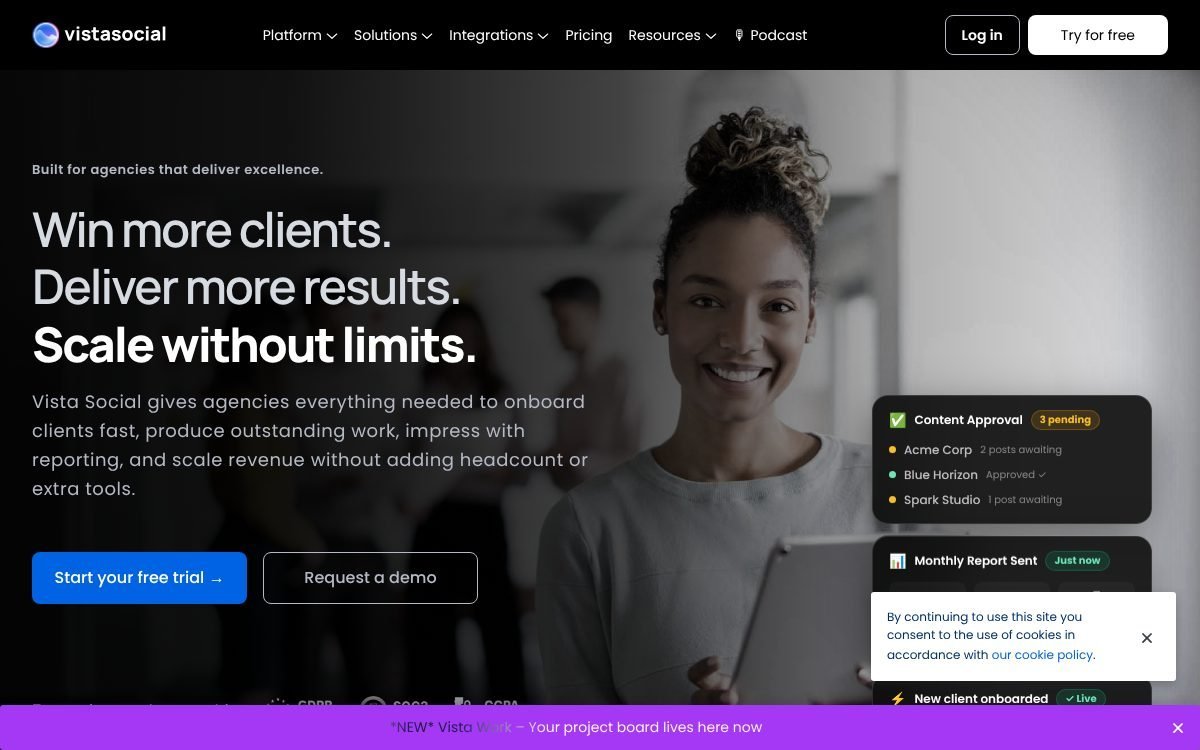
Vista Social is built around exactly that client workflow. Its agency page leads with “Win more clients. Deliver more results. Scale without limits.” and lists the pieces agencies need in one place.
What it does for an agency
- Client separation: each client gets a separate dashboard, and clients can be given access limited to their own data.
- Approvals: multi-step content review with client access, inline comments and approval locks, so posts don’t go live without sign-off.
- Bulk publishing: bulk scheduling and bulk upload across client profiles.
- Unified inbox: messages, comments and mentions in one place, plus DM and comment automation.
- Reporting: client reports with automated delivery; white-label reports with your logo and colors.
Vista Social pricing (November 2026)
- Professional: $99/month or $950/year. 15 social profiles, 2 users, 1,000 AI credits per month, approval stages for posts.
- Advanced: $199/month or $1,910/year. 30 profiles, 3 users, 2,000 AI credits. Adds approval workflows for internal teams and clients, custom reports and Zapier/Make integrations.
- Scale: $449/month or $4,310/year. 70 profiles, 4 users, 3,500 AI credits. Adds white-label reports and dashboards plus client profile connect (clients connect their own accounts). Extra profiles come in blocks of 10.
- Enterprise: custom pricing, SSO, dedicated account manager.
There is no free plan, but the three self-serve plans have a 14-day trial with no credit card required. Yearly billing saves 20% and is paid upfront. Add-ons include listening ($75/month) and an X (Twitter) integration ($29/month).
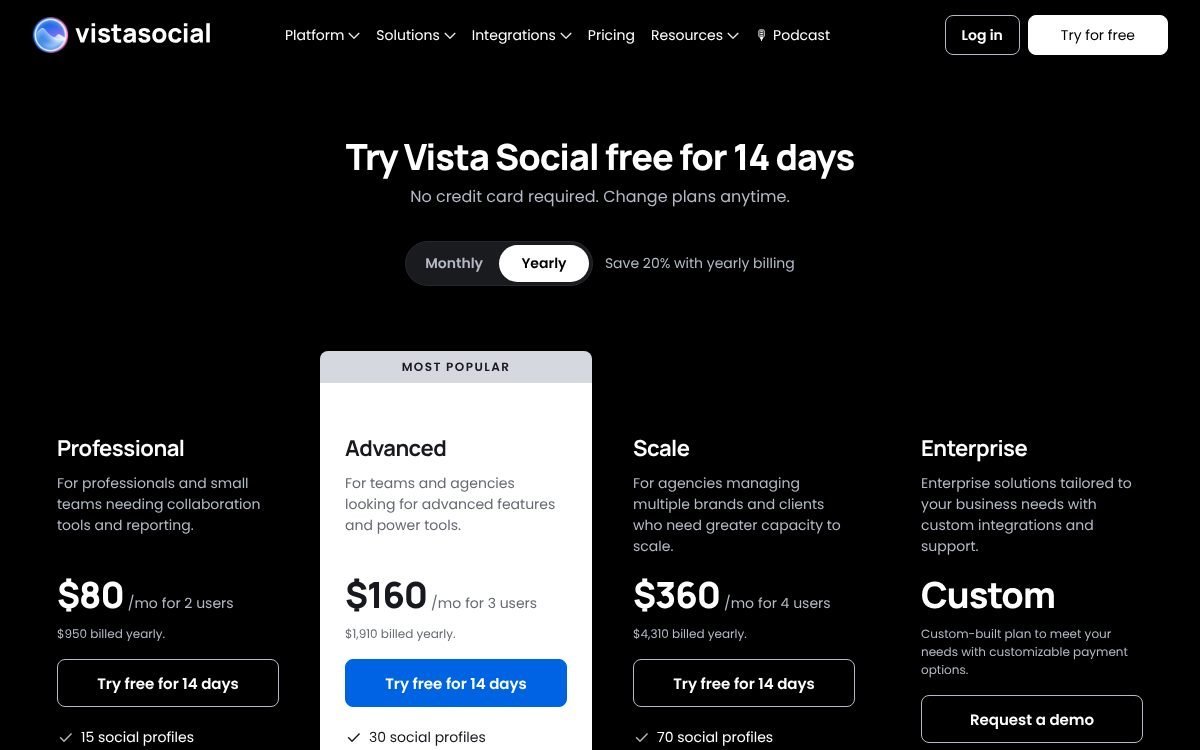
One thing to check: the agency page says features come with no per-seat charges, while the pricing table lists a set number of users per plan (2, 3 or 4). If your team is bigger than that, ask Vista Social how extra users are handled before you commit.
For a step-by-step look at planning and approving a month of posts, see our guide on how agencies schedule a month of client content in Vista Social.
Job 2: Prove ROI with lead and call reporting (WhatConverts)
Clients renew when they can connect your work to revenue. Platform dashboards show clicks and impressions, but a local service business cares about phone calls and form fills. If you can’t show which campaign produced which lead, the retainer is always at risk.
WhatConverts calls itself “Lead Tracking for Marketing Agencies and Clients.” It tracks four lead types in one place: phone calls, web forms, live chat and e-commerce transactions, and ties each one back to its marketing source.
What it does for an agency
- Call tracking: tracking numbers, dynamic number insertion (a different number shown per visitor source), call recording and transcripts.
- Form and chat tracking from the Plus tier, with campaign and keyword reporting and Google Ads, Bing and Analytics integrations.
- Report builder and scheduled reports from Pro, so clients get a lead report on a schedule.
- Multi-click attribution and customer journey on Elite.
- White label for $50/month extra on any tier: your branding on the dashboard and emails.
WhatConverts pricing (November 2026)
All prices are billed monthly, and usage (extra numbers, minutes, texts, transcription) is billed on top. Each plan includes a usage credit.
- Single account: Call Tracking $30, Plus $60, Pro $100, Elite $160 per month. Each includes a $30 usage credit.
- Agency (unlimited accounts): Plus $500, Pro $800, Elite $1,250 per month, with $250, $300 and $400 usage credits.
- Sample usage rates (agency): extra local number $1.75, local minute 4 cents, call transcription 2 cents per minute.
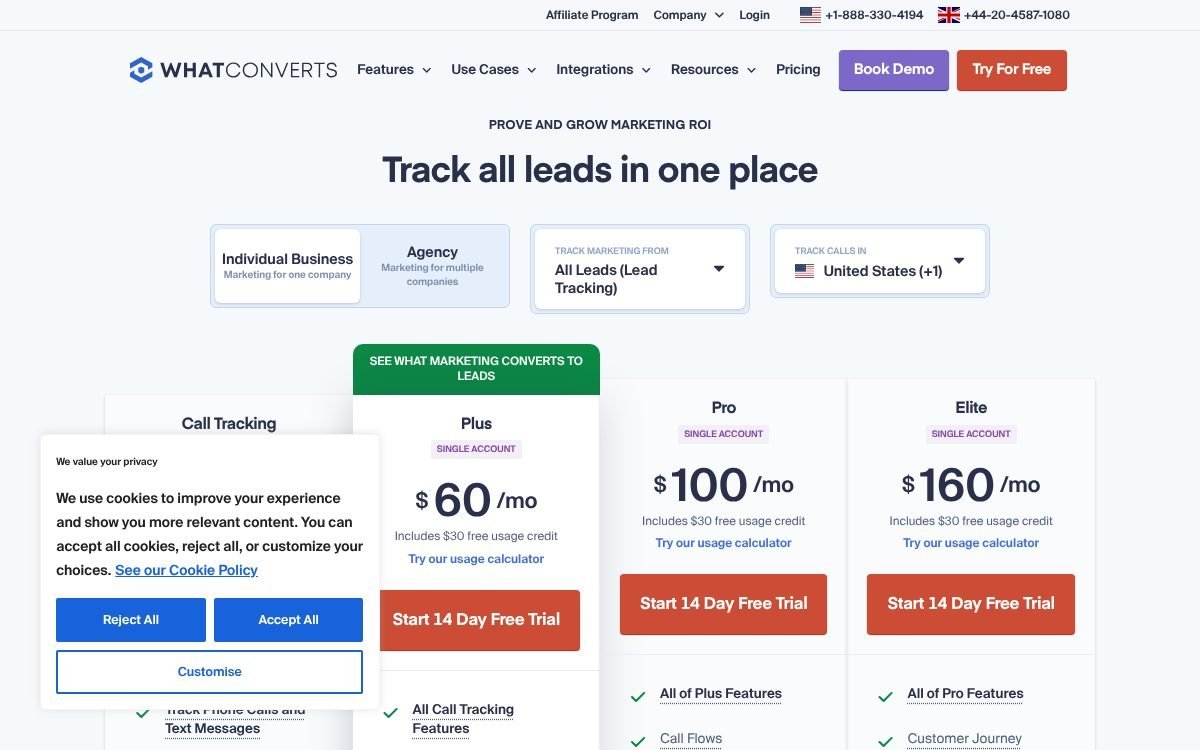
Every plan has a 14-day free trial. The pricing page’s comparison table and plan cards disagree on account counts for individual plans; the cards say single account, which is what we went with. For a deeper walkthrough, read lead tracking for agencies with WhatConverts.
Job 3: A business phone for the agency team (CallHippo)
Your team needs a phone line that isn’t someone’s personal mobile. Clients call the account manager, prospects call back after a pitch, and a freelancer leaves without handing over their number. A virtual phone system fixes that.
CallHippo gives the team business numbers that ring on desktop and mobile apps, with routing, voicemail, SMS and call logs.
CallHippo pricing (November 2026)
- Basic: $0 per user/month, billed annually, “pay only for numbers.” Voicemail, click to dial, SMS and MMS, desktop and mobile apps. The fair usage policy says Basic is free for the first 6 months, then you move to Starter.
- Starter: $18 per user/month. 1,000 US/Canada calling minutes, 100 SMS, call forwarding, ring all devices, Zapier, Slack and webhooks.
- Professional: $30 per user/month. Unlimited US/Canada minutes, call recordings, multilingual IVR, call transcription, lifetime call logs, and HubSpot, Salesforce, Pipedrive and Zoho integrations.
- Ultimate: $42 per user/month. Multilevel IVR, smart DID routing, call summary, SSO, dedicated account manager.
- Enterprise: custom pricing, 50-user minimum.
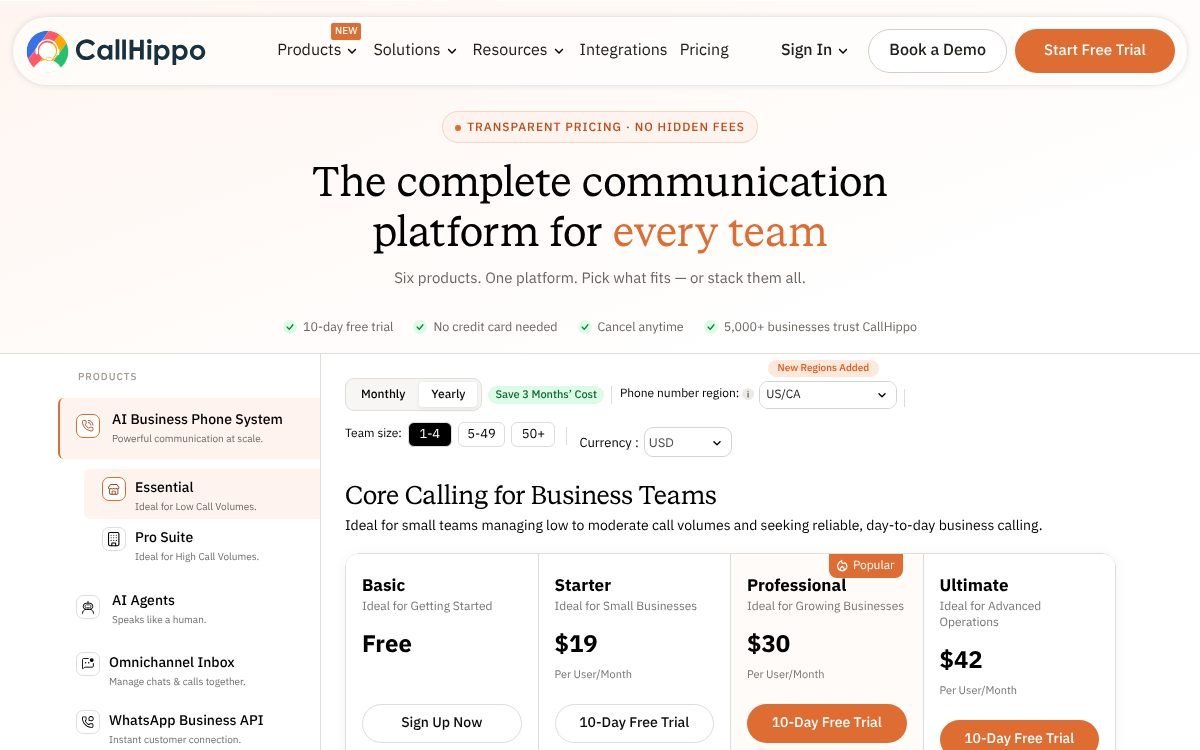
The pricing page shows a monthly/yearly toggle with “Save 3 Months’ Cost,” but it doesn’t label whether $18, $30 and $42 are the monthly or yearly rates. Phone numbers may be billed separately on some plans, and local taxes apply. There is a 10-day free trial with no card needed. Our CallHippo virtual business phone number setup guide covers the first-day configuration.
WhatConverts call tracking vs CallHippo: not the same thing
Both tools involve phone numbers and call recordings, so it is easy to think you only need one. You don’t. They answer different questions.
| WhatConverts call tracking | CallHippo phone system | |
|---|---|---|
| Question it answers | Which ad, keyword or channel made this client’s phone ring? | How does our team make and take calls professionally? |
| Whose calls | Your clients’ inbound leads | Your agency’s own calls |
| Where the number lives | On the client’s website and ads (dynamic number insertion) | On your agency’s website, email signatures and proposals |
| Who answers | The client’s existing line or staff (calls are forwarded) | Your team, in CallHippo’s desktop or mobile apps |
| Main output | Lead reports by source for the client | Call routing, voicemail, SMS, IVR and logs for your team |
| Billing | Per account (or agency plan), plus usage | Per user per month |
In short: WhatConverts is a measurement tool you install for clients; CallHippo is a telephone you give your team. A plumbing client’s calls should go through WhatConverts tracking numbers so you can report on them. Your account manager’s calls to that plumber go through CallHippo.
Job 4: Win new clients with outbound (Amplemarket)
Referrals dry up. At some point, most agencies need a repeatable way to reach new prospects instead of waiting. That’s what outbound software is for: finding contacts, sending multichannel sequences and spotting buyers who show intent.
Amplemarket is an AI outbound sales platform. Its pricing page lists multichannel sequences, AI intent signals and Duo Copilot on every plan.
Amplemarket pricing (November 2026)
Amplemarket publishes a price for one plan only. The other two are custom quotes.
- Startup: $600/month on an annual term. 2 users included, 27,000 contacts, 13,500 email credits and 600 phone credits per user per year, 2 mailboxes per user.
- Growth: custom pricing (no dollar figure published). 4 users, 140,000 contacts, adds Duo Voice and a dedicated customer success manager.
- Elite: custom pricing (no dollar figure published). 10 users, 400,000 contacts, adds Duo Inbox.
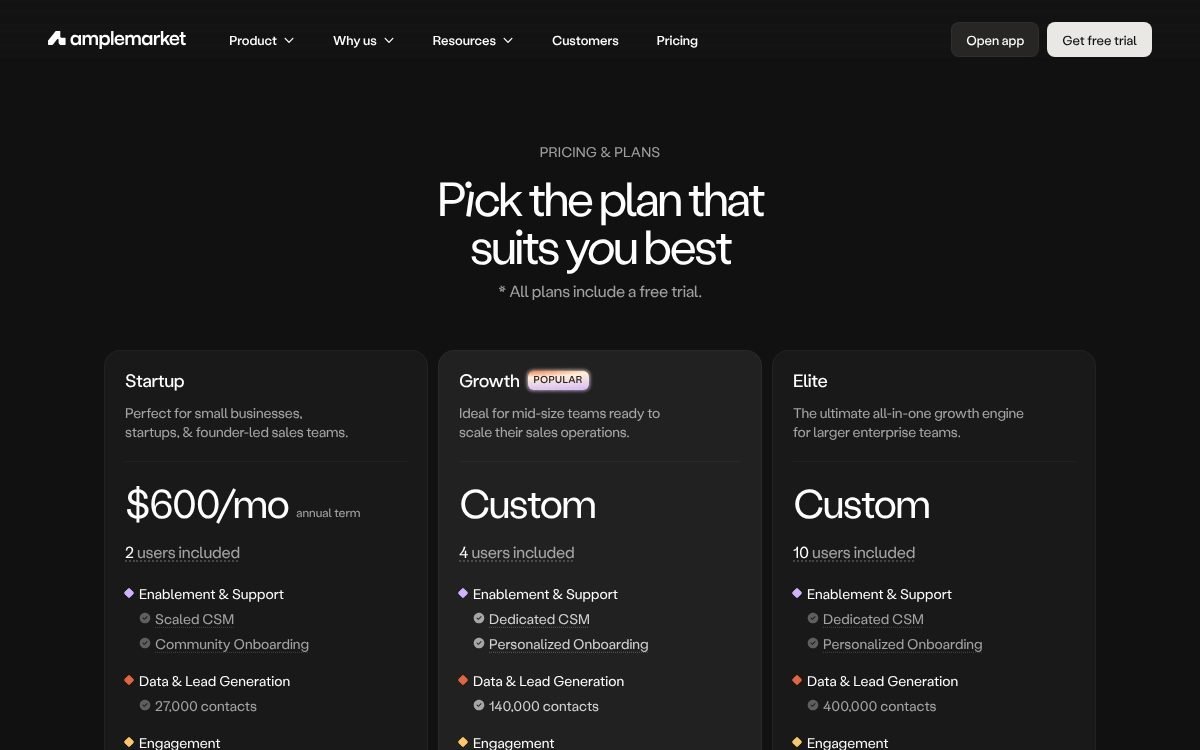
The page says “All plans include a free trial” but doesn’t give the length. It also doesn’t say whether extra users change the Startup price. Ask sales for a written quote.
Is it worth it for an agency? At $600/month on an annual commitment, Amplemarket makes sense once one new retainer covers a year of the tool and someone owns new business for at least a few hours a week. If no one will work the sequences, the credits go unused.
Job 5: Run agency operations in Notion
The four tools above each create information: posts, leads, calls, prospects. Something has to hold the rest: client details, SOPs, briefs, tasks, meeting notes and invoices. For most small agencies, that’s a Notion workspace.
Notion lets you build linked databases (clients, projects, tasks, content) and wiki pages in one place, then share specific pages with clients.
What an agency hub in Notion usually holds
- Clients database: contacts, retainer, services, contract dates and links to each client’s Vista Social calendar and WhatConverts reports.
- Briefs and projects: one page per brief, linked to tasks and deliverables.
- SOP wiki: onboarding checklists, how to set up tracking numbers, how approvals work.
- New-business pipeline: warm replies from outbound move here when they become real opportunities.
Notion pricing (November 2026)
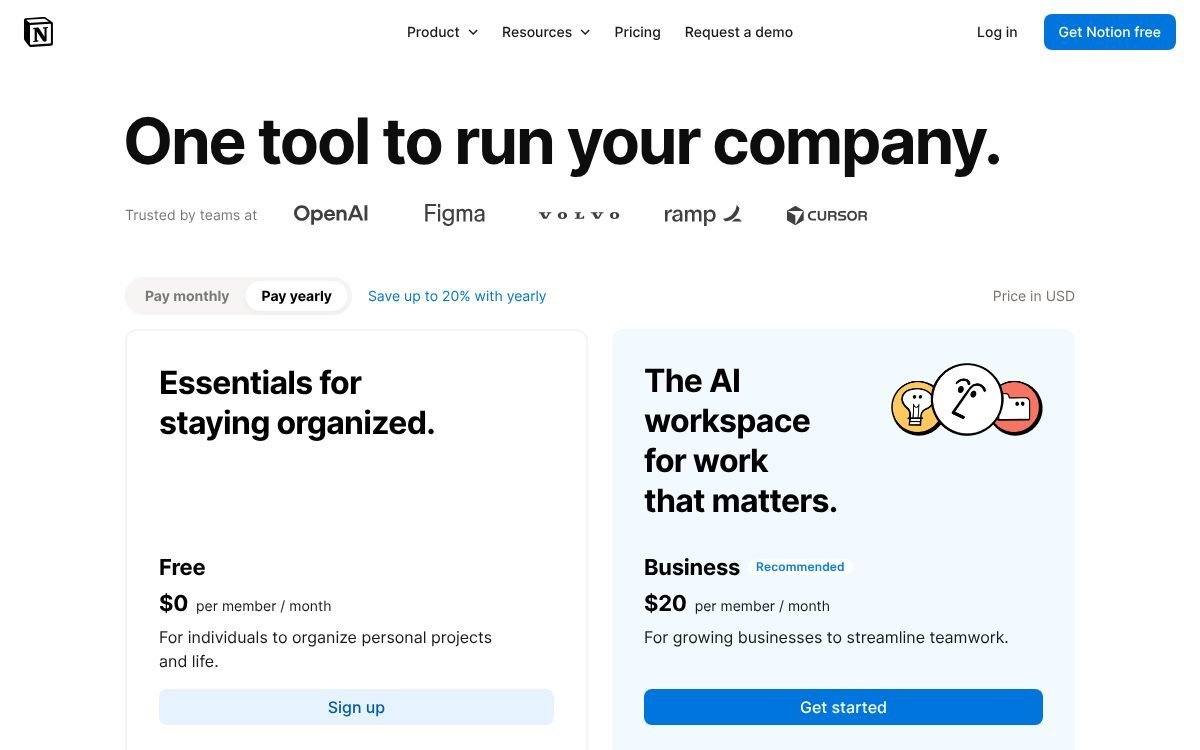
- Free: $0.
- Plus: $10 per seat/month billed yearly, or $12 billed monthly.
- Business: $20 per seat/month billed yearly, or $24 billed monthly. Includes Notion AI.
- Enterprise: custom pricing.
You don’t have to build the hub from scratch. Our Marketing Agency Notion Template: Clients to Invoices gives you the client, project and invoice databases already linked.
The first 90 days: what order to adopt these tools
Rolling out five tools at once guarantees half of them get ignored. Add them in the order that protects revenue first.
Days 1 to 14: the operations hub and the phone line
- Set up Notion first. Create a clients database and an SOP page, and move every active brief into it. Everything else will link back here.
- Get a CallHippo number for the team. Put it on your website, proposals and email signatures so client calls stop going to personal phones.
Days 15 to 45: client delivery
- Start the Vista Social trial and connect two or three clients first, not all of them.
- Schedule a full month for those clients and run every post through the approval flow.
- Write the process down as an SOP in Notion, then onboard the remaining clients.
Days 30 to 60: proof of ROI
- Pick the clients where phone calls and forms matter most (local services, healthcare, home services).
- Install WhatConverts tracking on their sites and connect Google Ads and Analytics.
- Let a few weeks of data build, then send the first scheduled lead report alongside your usual monthly recap.
Days 60 to 90: new business
- Now that delivery and reporting are steady, add outbound. Book an Amplemarket demo and get a written quote.
- Use your WhatConverts reports as proof in outreach: “we track every call our campaigns generate” is a stronger pitch than a portfolio link.
- Move warm replies into a new-business pipeline in Notion.
Why this order? Operations and the phone line are cheap and fix daily friction. Delivery and reporting protect the clients you already have. Outbound costs the most, so it comes last, once you can handle the extra work it brings in.
Which tools a 2-person agency vs a 15-person agency needs
Team size changes both which tools you need and which plan tier makes sense. Here is how the stack scales, using list prices from each vendor’s page.
The 2-person agency
- Vista Social Professional ($99/month): 15 profiles and 2 users covers roughly 4 to 5 clients on three networks each.
- WhatConverts: only if you sell lead generation. A single-account plan covers one account; once you’re tracking several clients, compare that against the $500/month agency tier (or ask clients to pay for their own account).
- CallHippo Basic or Starter: $0 during Basic’s free period, then $18 per user/month (about $36/month for two).
- Amplemarket: usually skip for now. $600/month on an annual term is a big fixed cost for two people.
- Notion Free or Plus: $0, or $20/month for two seats billed yearly.
Rough core cost: about $99 to $155 per month for social, phones and Notion, before any WhatConverts accounts.
The 15-person agency
- Vista Social Scale ($449/month): 70 profiles, white-label reports and client profile connect. Listed users are 4, so confirm how the rest of the team gets access, or talk to sales about Enterprise.
- WhatConverts Agency Plus or Pro ($500 or $800/month, plus $50 for white label and any usage): unlimited client accounts.
- CallHippo Professional ($30 per user/month): call recording, IVR and CRM integrations. If 10 of the 15 need a line, that’s about $300/month.
- Amplemarket Startup ($600/month, annual term, 2 users): for a founder plus a business-development lead. Growth (4 users) is a custom quote.
- Notion Business ($20 per seat/month billed yearly, AI included): $300/month for 15 seats.
| Tool | 2-person agency | 15-person agency |
|---|---|---|
| Vista Social | Professional, $99/month | Scale, $449/month |
| WhatConverts | Optional; single account from $30/month | Agency Plus $500 or Pro $800/month, + $50 white label |
| CallHippo | Basic ($0 for 6 months) or Starter, $36/month | Professional, about $300/month for 10 users |
| Amplemarket | Usually skip | Startup, $600/month (annual term) |
| Notion | Free or Plus, $0 to $20/month | Business, $300/month (yearly) |
| Rough monthly total | About $99 to $155 | About $2,200 to $2,500 |
These totals are estimates from list prices and exclude WhatConverts usage, CallHippo number fees and taxes. The 15-person total assumes WhatConverts Agency Plus or Pro with white label.
Tips for choosing the best tools for marketing agencies
- Price per client, not per month. Divide each tool’s cost by active clients. If a tool costs more per client than it adds to the retainer, wait.
- Pass reporting costs through. Lead tracking is a service clients value; many agencies include it as a line item in the retainer.
- Use the trials in sequence. Vista Social and WhatConverts trials are 14 days and CallHippo’s is 10. Start one at a time so you can actually test each.
- Watch annual terms. Amplemarket’s published price is on an annual term, and Vista Social’s yearly plan is paid upfront. Commit only after the trial.
- Keep one source of truth. Link each client’s tools from their Notion page so nobody hunts for logins or reports.
FAQ
What are the best tools for marketing agencies in 2026?
Pick one per job: Vista Social for client social media, WhatConverts for lead and call reporting, CallHippo for the team’s phone system, Amplemarket for outbound new business, and Notion for operations.
Do I need both WhatConverts and CallHippo?
If you report on client leads and also want a professional line for your team, yes. WhatConverts tracks which marketing source made a client’s phone ring. CallHippo is the phone system your own staff use. One doesn’t replace the other.
Does Amplemarket publish its prices?
Partly. As of November 2026, the Startup plan is listed at $600/month on an annual term with 2 users. Growth and Elite show “Custom” with no dollar figure, so you need a quote.
Is there a free plan for any of these tools?
Notion has a free plan. CallHippo’s Basic plan is $0 per user, and its fair usage policy says it is free for the first 6 months. Vista Social, WhatConverts and Amplemarket offer free trials instead of free plans.
Which Vista Social plan has white-label reports?
White-label reports and dashboards are listed on the Scale plan ($449/month or $4,310/year) and above, along with client profile connect.
What’s the cheapest way to start?
Notion Free plus CallHippo Basic costs almost nothing (apart from number fees). Add Vista Social Professional at $99/month when you start managing client social, and WhatConverts when a client needs lead reporting.
Bottom line
The best agency stack is small and covers each job once. Start with Notion and a CallHippo line, add Vista Social for delivery, prove results with WhatConverts, and bring in Amplemarket when you’re ready to grow on purpose. If client social is your main service, the Vista Social trial is the place to start.
Notion systems, spreadsheets and planners with a setup guide. Instant download.