Retro Digital Planner 2027: Groovy Sunset Landscape
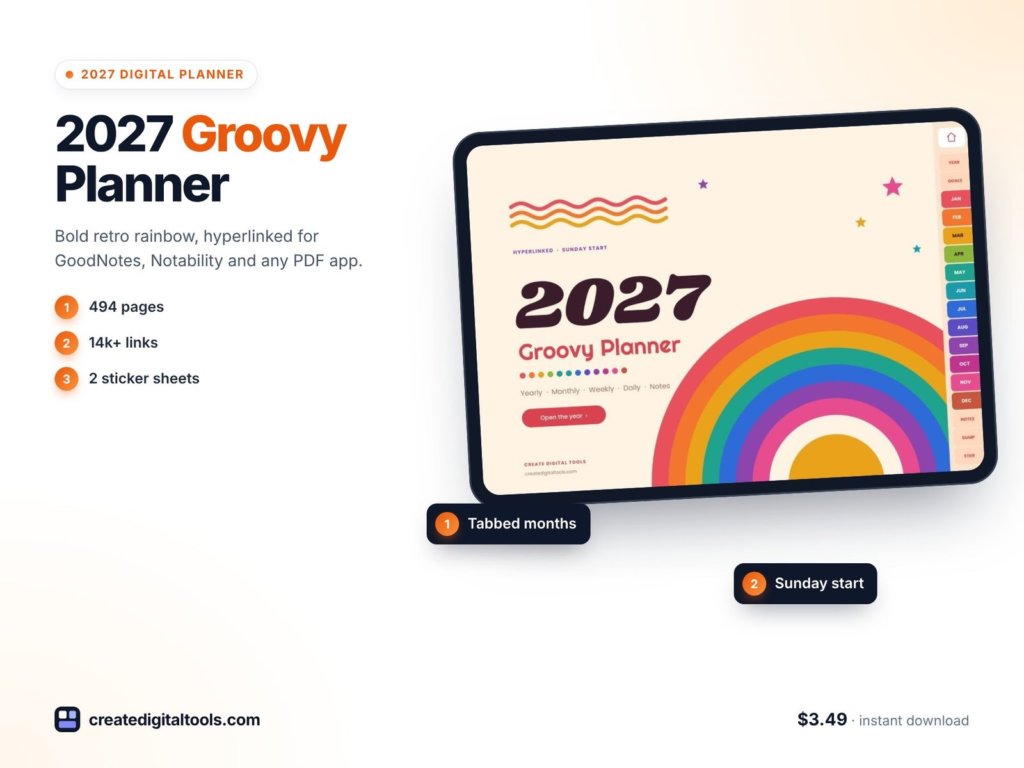
Picture someone who still keeps a shelf of vinyl, wears warm colours all year and finds most planners a little too clinical. They want their 2027 pages to feel like a sunset drive, not a spreadsheet. They plan on an iPad turned sideways, with a keyboard case, and they think in Sunday-to-Saturday weeks. This illustrative scene is who our retro digital planner 2027, the Groovy Sunset edition, was made for.
In this guide you will find practical tips for planning in a landscape digital planner, how to use brain dump pages well, and a full tour of what is inside.
Get the 2027 Retro Digital Planner →
Why a planner’s look matters more than you think
It is easy to dismiss style as decoration. In practice, how a planner looks has a lot to do with whether you open it. If the pages feel cold or generic, planning becomes a chore that slips to “later”. If they feel like yours, you come back.
The other common problem is overwhelm. A daily page full of boxes can make a busy day feel worse. Many people find it easier to empty their head first, then decide what matters. That is why this planner includes monthly brain dump pages alongside the usual calendars.
Layout matters too. A landscape page suits a tablet in a keyboard case or a stand on a desk, and gives room for a wide daily schedule next to your lists.
How to plan well in a landscape digital planner
1. Import it as its own notebook
In GoodNotes, Notability, Noteshelf or Xodo, import the PDF as a new notebook. This keeps every internal link working.
2. Start each month with a brain dump
Before you touch the calendar, empty everything onto the brain dump page: tasks, ideas, things you are waiting on, and things you can let go. Then move only the important items into the month.
3. Use the Sunday start to your advantage
If your week starts on Sunday, use Sunday evening for a short weekly page check: what is fixed, what is the focus, what can wait.
4. Keep daily pages short
Three priorities, a few to-dos and your schedule. If a day has more than that, some of it belongs on another day.
5. Track two things, not ten
Water and mood trackers are quick to fill in. Start there before adding more habits.
6. Reflect monthly
A short review at the end of each month, with a simple rating across a few life areas, shows patterns you would otherwise miss.
A simple Sunday planning ritual
If you like the idea of a weekly reset but never quite do it, try this short version on Sunday evening:
- Open the weekly page and write down anything fixed: appointments, deadlines, plans with friends.
- Glance at this month’s brain dump page. Move one or two items into the week.
- Write a single focus for the week. One line is enough.
- Tap through to Monday’s daily page and choose its top 3.
- Close the planner. That is the whole ritual.
Keeping it this short is the point. A routine you can finish in ten minutes on a tired Sunday is one you will actually keep.
Making a retro planner your own
Digital planners are easy to personalise. Use the sticker sheets for recurring labels, add your own photos to the vision board frames, and pick two or three pen colours that suit the warm palette, such as a deep orange, a mustard and a brown, so your handwriting blends with the page rather than fighting it. Lined and dotted notes pages at the back are useful for lists, journaling or meeting notes you want to keep close to your calendar.
Getting started before January
Because the first weekly page begins on 27 December 2026, you can start using the planner during the quiet days between holidays. That is a good time to fill in the year pages: write your yearly goals, split them into the four quarterly boxes, choose the four habits you want to track, and add a few images or words to the vision page. When 1 January arrives, the planner already feels lived in, and the first real week starts with direction rather than a blank screen.
Inside the 2027 Retro Digital Planner, Groovy Sunset
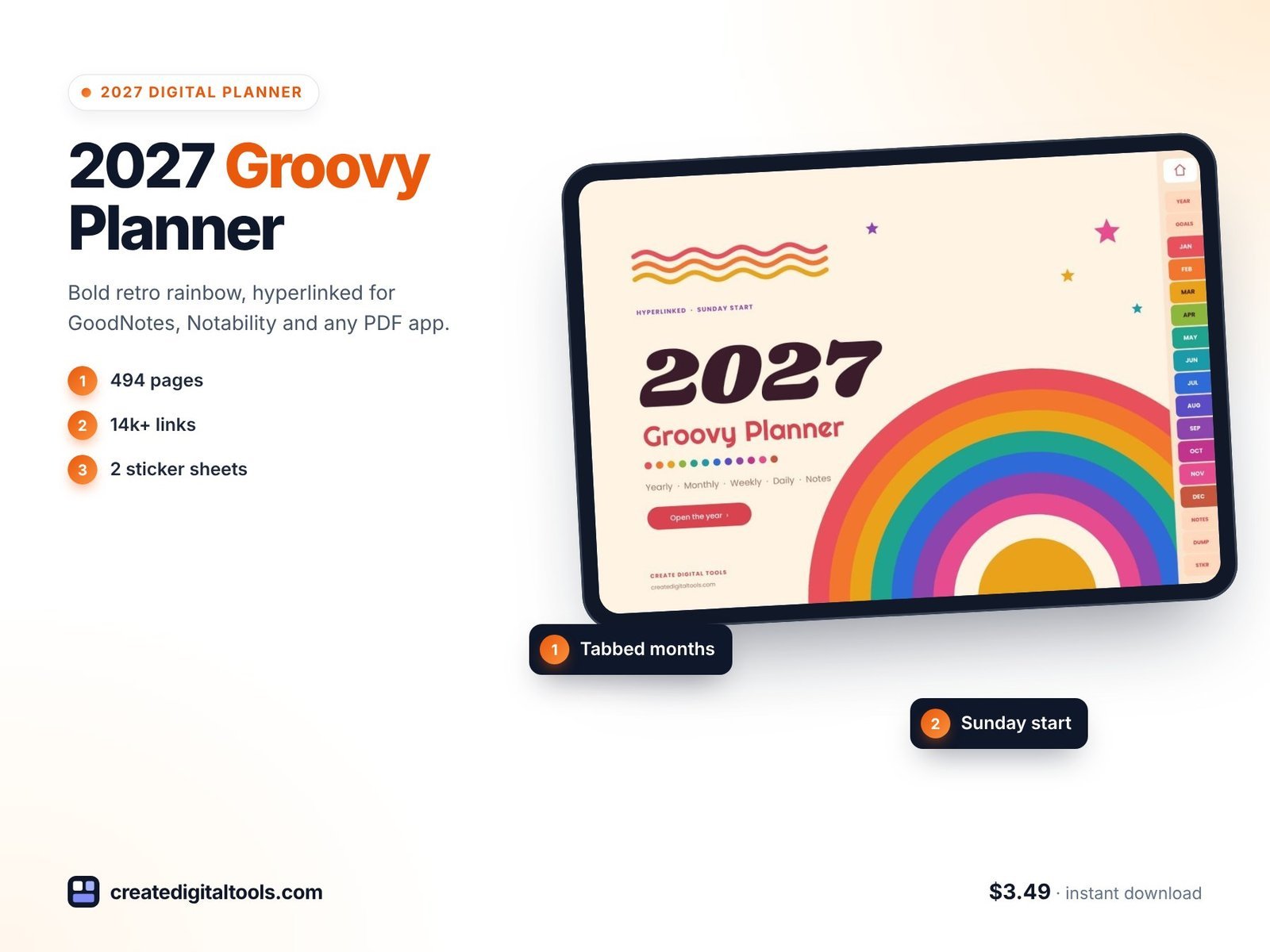
The planner is a 494-page hyperlinked PDF in landscape (2388 × 1668 px), about 7.4 MB, with a cream background and 12 retro month colours. It uses a Sunday start and works with GoodNotes, Notability, Noteshelf, Xodo and other PDF annotation apps that support internal links, on iPad or Android tablets.
Year pages
A year-at-a-glance page has 12 mini calendars that link to months and dates. There is a 2027 goals page with yearly goals and 4 quarterly goal boxes, a vision page with reflection prompts and vision board frames, and a yearly habit tracker for 4 habits across 12 months.
Monthly pages
Twelve monthly calendars (Sunday start), with dates linking to daily pages and week numbers linking to weekly pages. Each month also has a Goals & Focus page covering goals, key dates, focus notes and a month review, and a Reflection page with prompts and a 10-dot rating for 8 life areas.
Brain dump pages
Twelve brain dump pages, one per month, split into to do, ideas, waiting on and let it go.
Weekly and daily pages
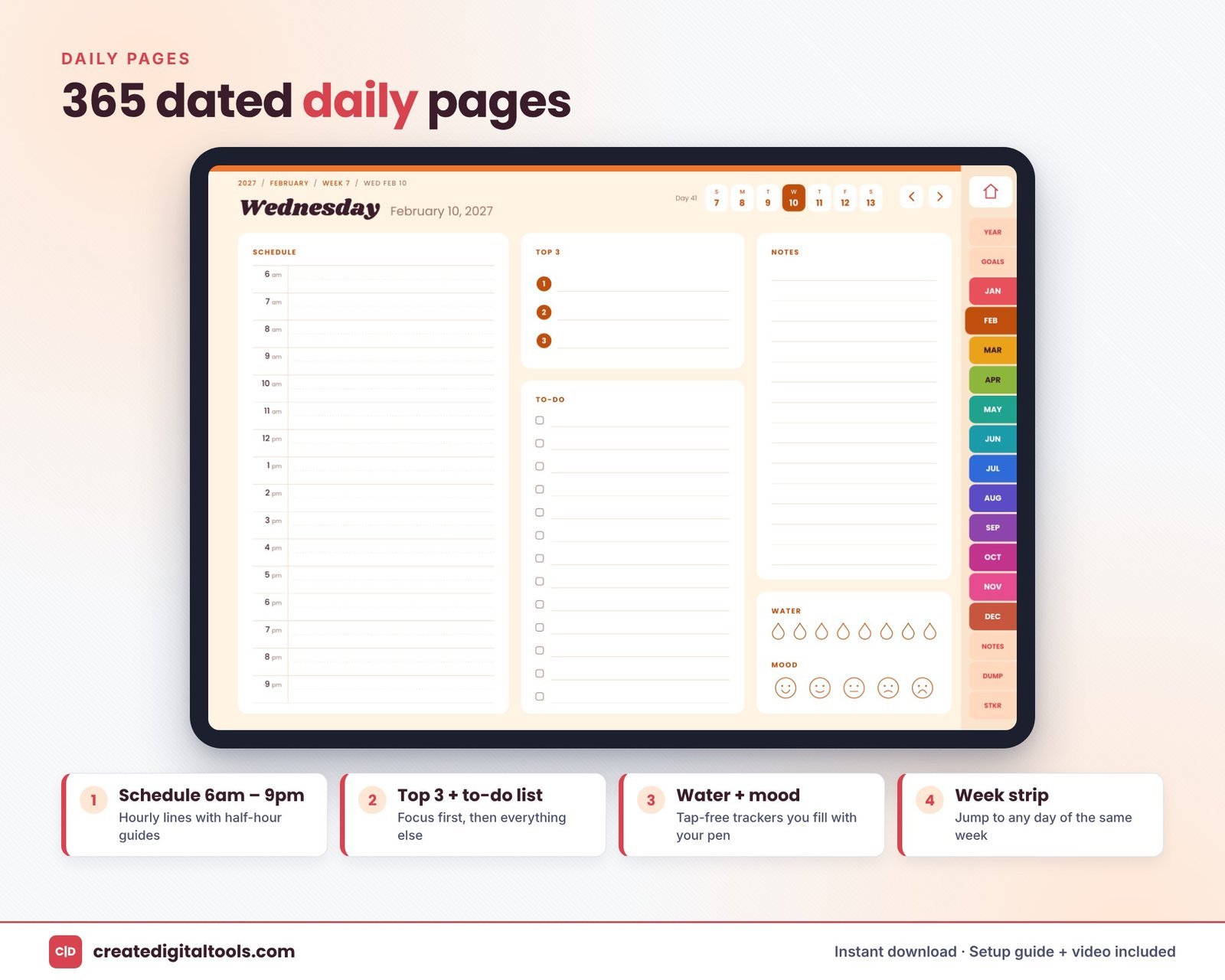
There are 53 weekly pages, including one for 27 December 2026 to 2 January 2027 so the year starts cleanly. The 365 daily pages each have a 6am to 9pm schedule, top 3 priorities, a to-do list, notes, water and mood trackers, and a tappable week strip.
Stickers and notes
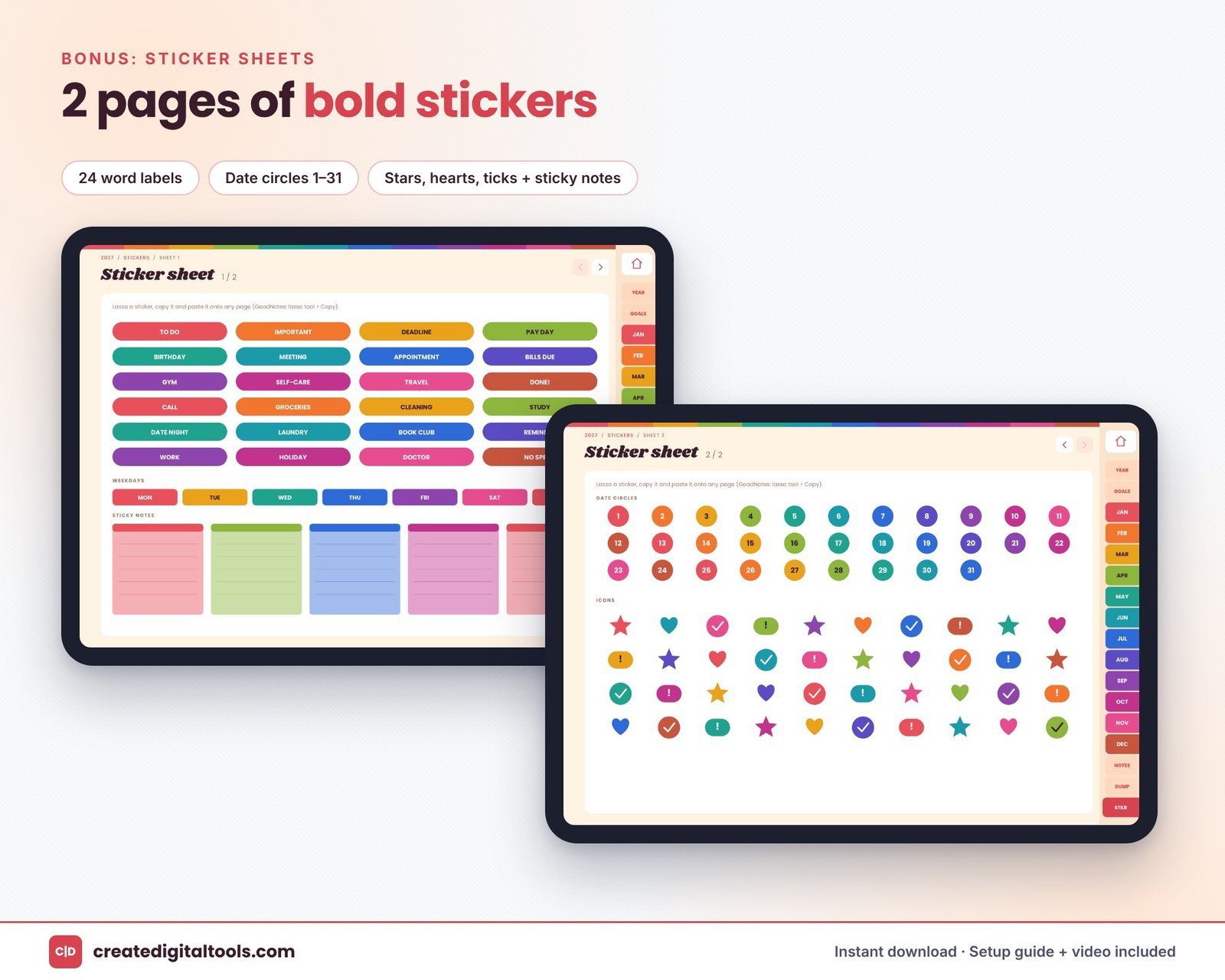
Two sticker sheets include 24 word labels, weekday labels, date circles 1 to 31, stars, hearts, ticks and sticky notes. Twenty notes pages alternate between lined and dotted.
A Setup Guide PDF and a setup video are included.
Take a look inside
This walkthrough shows the Groovy Sunset pages and stickers in a planner app:
Who it is for, and who it is not for
A good fit if you:
- Love warm, retro colour and want a planner that feels personal.
- Use your tablet in landscape, on a stand or in a keyboard case.
- Prefer a Sunday-start week.
- Like to brain dump before you plan.
Probably not for you if you:
- Hold your tablet upright to write. A portrait layout will suit you better.
- Need a Monday-start week.
- Want a paper planner. This is a digital download for PDF apps.
If you like an earthy look but want a different palette, see the 2027 Boho Digital Planner in Terracotta. More styles are in our digital planners collection.
Frequently asked questions
Which apps can I use?
GoodNotes, Notability, Noteshelf, Xodo and other PDF annotation apps that support internal links, on iPad or Android tablets.
Does the week start on Sunday or Monday?
Sunday.
Is it landscape or portrait?
Landscape, at 2388 × 1668 px.
Is it an instant download?
Yes. It is a digital download for personal use; no physical item is sent.
Does it cover the last days of December 2026?
Yes. The first weekly page runs from 27 December 2026 to 2 January 2027.
If you want 2027 to feel a bit warmer every time you open your planner, the Groovy Sunset edition is ready to import.
Get the 2027 Retro Digital Planner →
GoodNotes, Notability, Noteshelf and Xodo are trademarks of their respective owners. This is an independent planner, not affiliated with or endorsed by any of them.
Notion systems, spreadsheets and planners with a setup guide. Instant download.